Xbox 360 & PC Wireless Controller with Dual Vibration
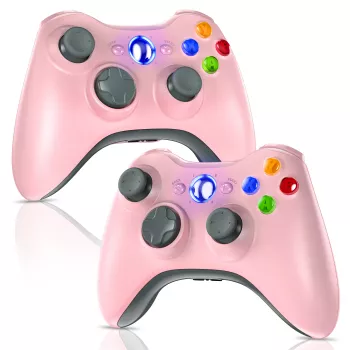
Wireless Gaming Controller for Xbox 360 & PC with Dual Vibration
A reliable gamepad can make the difference between clumsy inputs and confident play. This wireless controller is built for Xbox 360 and Windows PC sessions, with dual vibration feedback for a more immersive feel in racing, shooters, and action games. Below is a practical breakdown of what it offers, how it connects, and what to expect in day-to-day use. For more guidance, see Retro-Bit V2 Wireless Tribute 64 Review – Archades Games.
At a glance
- Designed for Xbox 360 and compatible Windows PC setups
- Dual vibration feedback for impact, recoil, and road texture cues
- Wireless play for a cleaner setup and couch-friendly gaming
- Classic controller layout suited to a wide range of genres
- Good fit for spare-controller needs, casual play, and retro/legacy PC titles that support gamepads
Quick details
| Item | What it means for play |
|---|---|
| Platform support | Works with Xbox 360 and many Windows PC games that accept XInput/compatible controllers |
| Vibration | Dual motors provide tactile feedback for events like collisions, gunfire, and explosions |
| Connection | Wireless freedom for living room or desktop setups |
| Use cases | Racing, sports, action-adventure, platformers, and co-op sessions |
| Price point | Budget-friendly option for adding a controller to a PC or replacing a worn gamepad |
Compatibility and setup
- Xbox 360: Intended for use within the Xbox 360 ecosystem; pairing steps depend on the console and wireless receiver requirements.
- PC: Many Windows games detect controllers automatically, especially those with built-in controller support; some titles may require configuring controls in the game’s settings menu.
- Check receiver needs: Wireless controllers for Xbox 360 PCs often require a compatible wireless receiver/dongle; confirm what’s needed before checkout if a receiver is not included.
- Controller mapping: For games that don’t recognize the controller immediately, settings such as “controller enabled,” input mode, or button remapping may be necessary.
For official setup guidance on Windows, Microsoft’s documentation can help clarify driver/connection expectations for Xbox 360-style controllers: Microsoft Support — Set up and use an Xbox 360 Controller on Windows. For further reading, see Xbox Wireless Controller.
Dual vibration: what it adds
- More informative feedback: Dual motors can separate “big impact” sensations from smaller cues, helping your hands read what’s happening without pulling your eyes away from the action.
- Better racing feel: Subtle vibration can communicate curbs, traction loss, and contact in driving games—especially when you’re riding the edge of grip.
- Shooter feedback: Recoil and explosions feel more grounded when vibration is balanced rather than a single harsh rumble.
- Comfort tip: If vibration becomes distracting, many games allow reducing intensity or disabling it entirely.
Wireless performance for real-world play
- Freedom of movement: Wireless makes it easier to game from a couch, bed, or a standing desk without cable drag catching on chair arms or desk edges.
- Stable sessions depend on environment: Distance, walls, and nearby wireless devices can influence responsiveness; keeping the receiver in a clear line of sight can help.
- Good for local multiplayer: A wireless setup reduces cable clutter when adding extra controllers for co-op or party games.
- If input delay is noticed: Try repositioning the receiver, changing USB ports, reducing interference, or updating any relevant drivers.
If most of your PC gaming runs through Steam, controller detection and per-game layouts can often be smoothed out using Steam Input. Valve’s documentation is a useful reference when a game needs a quick mapping fix: Valve Support — Steam Input documentation and controller setup.
Controls, ergonomics, and build feel
- Familiar layout: The Xbox-style button arrangement is widely supported in modern and legacy games, reducing the need to re-learn muscle memory when switching between keyboard/mouse and controller.
- Grip and comfort: Rounded handles and balanced weight help with longer sessions; comfort still varies by hand size, so a short “warm-up session” is a smart way to judge fit.
- Analog control: Thumbsticks are key for camera control and smooth movement; sensitivity can usually be adjusted in-game for aiming or steering to match your preference.
- D-pad and face buttons: Useful for menus, fighting games, and classic platformers; button feel can vary between controller models, so expect a budget-friendly but functional experience.
- Care basics: Keep the controller clean, avoid drops, and store it away from dust to reduce stick drift and button sticking over time.
Who it’s best for
- PC players who want a straightforward controller for gamepad-friendly titles without spending premium-controller pricing
- Xbox 360 owners needing a replacement or extra controller for local multiplayer
- Players focused on casual to mid-competitive play where comfort and familiarity matter more than advanced features
- Gamers who enjoy vibration feedback for immersion, especially in racing and action games
- Not ideal for: Those needing modern console support beyond Xbox 360, or advanced features like back paddles, motion controls, or extensive software customization
Common setup fixes
In-stock picks
- Wireless Gaming Controller for Xbox 360 & PC with Dual Vibration ($28.01)
- Artificial Green Plant Ball ($88.01)
- Large Cat Tree for Indoor Cats ($82.01)
FAQ
Does a wireless Xbox 360 controller work on a Windows PC without extra hardware?
Many wireless Xbox 360-style controllers require a compatible wireless receiver/dongle for PC use unless the package includes one. Before buying, confirm whether a receiver is included and whether Windows detects the adapter properly once connected.
Can vibration be turned off?
Yes. Most games include a vibration toggle or intensity slider in their controller settings, and you can disable it if you prefer a quieter, less distracting feel.
What should be checked if the controller connects but inputs lag or drop?
Shorten the distance, improve line of sight between controller and receiver, and move the receiver away from interference sources like routers or USB 3.0 hubs. Trying a different USB port and confirming drivers/settings can also improve stability.










Leave a comment